Microsoft Defender for Endpoint (MDE)
Installs Microsoft Defender for Endpoint (formally Advanced Threat Protection - ATP) on Windows hosts (10/11 and 2016, 2019, 2022)
You must add your own WindowsDefenderATPLocalOnboardingScript.cmd file to the files directory of this role on the Ludus host!
Using this role - Onboarding
-
Go to Onboarding settings
-
Download the onboarding package (Windows 10/11 is the same as Windows server 2019/2022). For Windows server 2016 you must download the
md4ws.msifile using the same method and move it to the files directory of this role.
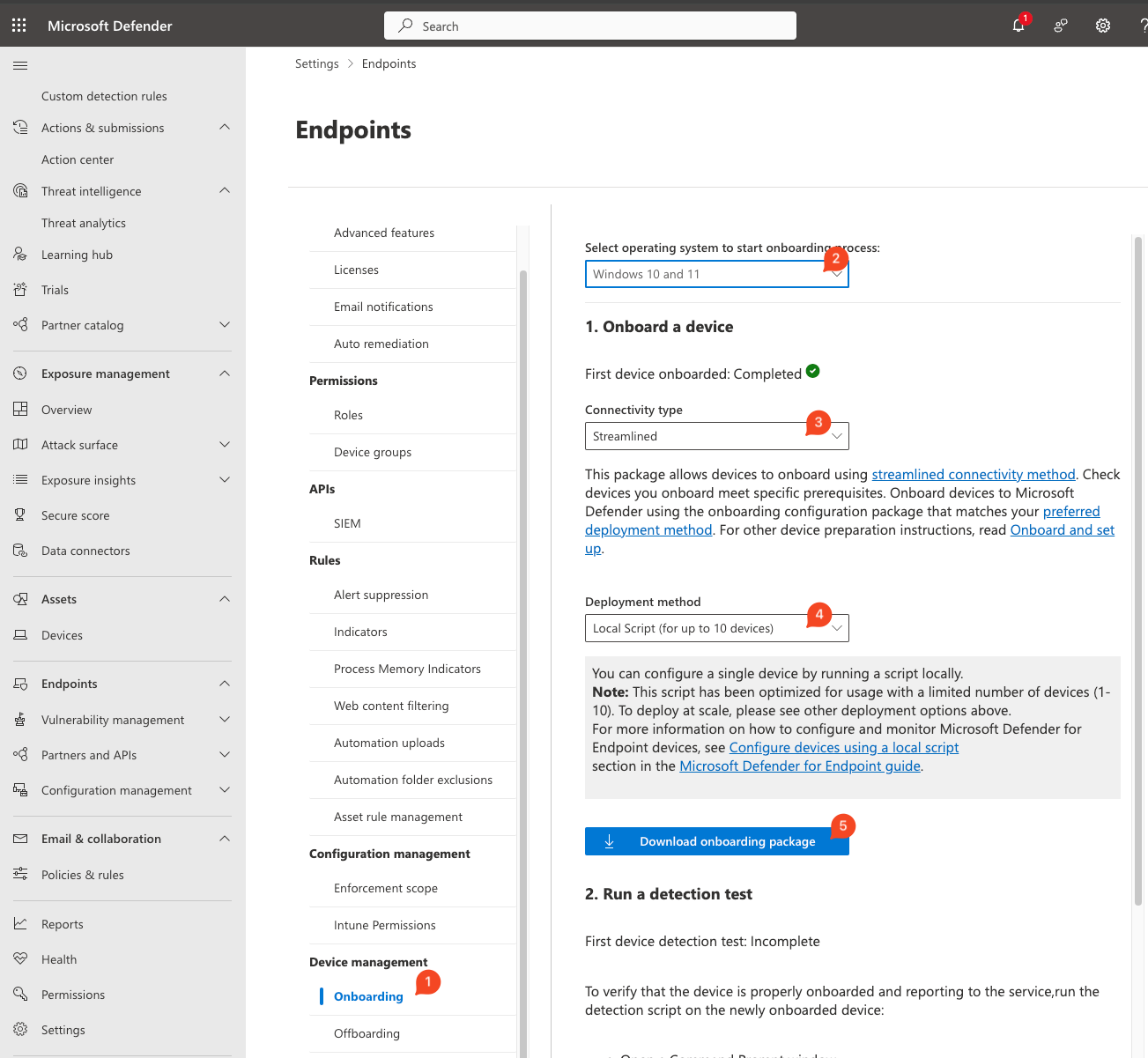
- Unzip
GatewayWindowsDefenderATPOnboardingPackage.zipand move theWindowsDefenderATPLocalOnboardingScript.cmdto the files directory of this role
/opt/ludus/users/<username>/.ansible/roles/ludus_MDE/files
or if installed globally at
/opt/ludus/resources/global-roles/ludus_MDE/files
Using this role - Offboarding
-
Go to Offboarding settings
-
Download the onboarding package (Windows 10/11 is the same as Windows server 2019/2022)
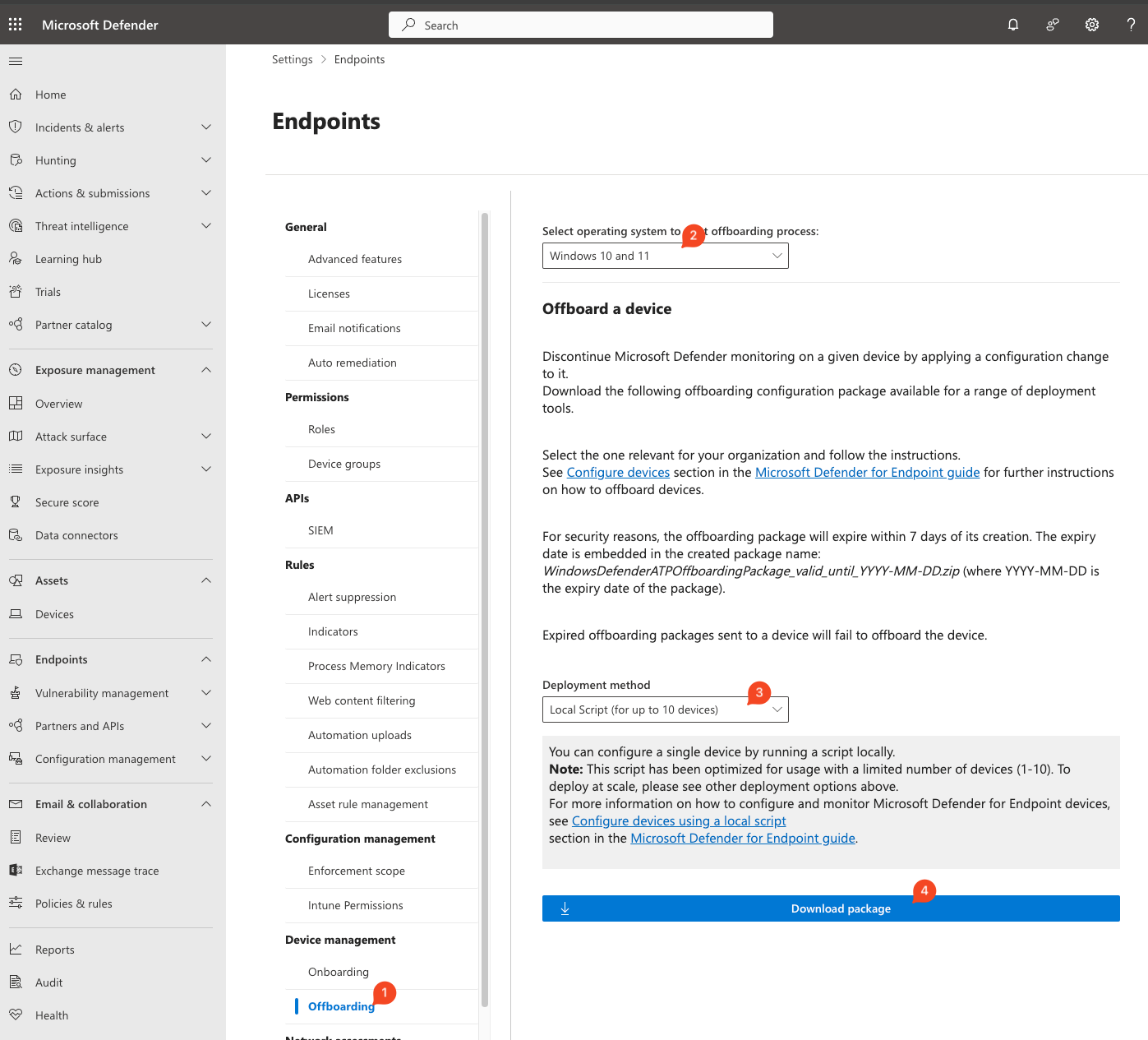
- Unzip
WindowsDefenderATPOffboardingPackage_valid_until_*.zipand move theWindowsDefenderATPOffboardingScript_valid_until_*.cmdto the files directory of this role
/opt/ludus/users/<username>/.ansible/roles/ludus_MDE/files
or if installed globally at
/opt/ludus/resources/global-roles/ludus_MDE/files
-
Add the role to your ludus configuration (see example-config.yml) with the role_var
ludus_MDE_action: offboardand update the config withludus range config set -f config.yml -
Deploy the range with
ludus range deploy -t user-defined-roles
Role Variables
Available variables are listed below, along with default values:
# Specify the action for the role to take (default: onboard, options: [onboard, offboard])
ludus_MDE_action: onboard
# Specify a tag to apply to the machine using the registry (default: none)
# Note: Only one tag can be applied to a machine using this method and it must be < 200 characters
ludus_MDE_tag:
Example Ludus Range Config
ludus:
  - vm_name: "{{ range_id }}-ad-dc-win2022-server-x64-1"
    hostname: "{{ range_id }}-DC01-2022"
    template: win2022-server-x64-template
    vlan: 10
    ip_last_octet: 11
    ram_gb: 6
    cpus: 4
    windows:
      sysprep: true
    domain:
      fqdn: ludus.domain
      role: primary-dc
    roles:
      - ludus_MDE
    role_vars:
      ludus_MDE_action: onboard
      ludus_MDE_tag: Ludus