🏘️ Cluster Support
Ludus can run on a Proxmox cluster (multiple nodes). On a cluster, Ludus uses Proxmox SDN (Software-Defined Networking) with VXLAN so that range networks span nodes. On a single node, it uses a local bridge configuration (vmbr1000, vmbr1001, etc).
Detecting cluster mode
Cluster mode is detected automatically: if the Proxmox API reports more than one node, Ludus enables cluster mode. You can override this in the server config (/opt/ludus/config.yml) with cluster_mode: true or cluster_mode: false.
Cluster prerequisites
Ludus can't automatically create a working VXLAN SDN Zone for your cluster. Do this by hand!
- SDN zone: In cluster mode, Ludus does not create the SDN zone. You must create a VXLAN-type zone in Proxmox (Datacenter → SDN) and set the VXLAN peer IPs so that range traffic can cross nodes. The zone name must match
sdn_zone(defaultludus). - VNets: Ludus creates one VNet per range (e.g.
r1,r2) and a NAT VNet (ludusnat) in that zone. Range VNets are VLAN-aware and use the VXLAN tag derived fromvxlan_tag_baseand the range number. Note that Ludus will create theludusnatzone with VXLAN tag16777215. You can change this value after theludusnatVNet is created in Proxmox (Datacenter → SDN → VNets → ludusnat → Edit → Tag). - Shared Storage: In order for templates to be cloned across the cluster, all nodes must have access to shared storage and that storage must be set as
proxmox_vm_storage_poolin/opt/ludus/config.yml. Ludus will build all the templates on the node set asproxmox_nodein the config.
Create a VXLAN Zone
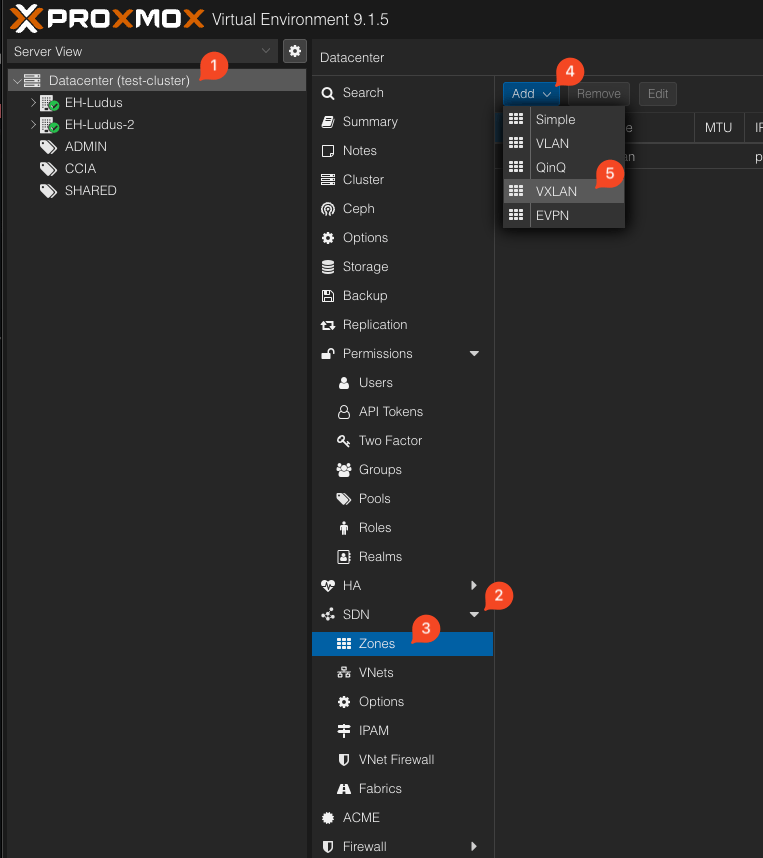
For ID use ludus unless you have changed the value of sdn_zone in /opt/ludus/config.yml.
Range configuration: node placement
When deploying ranges on a cluster, you can control which Proxmox node each VM uses. These keys are valid only when the Ludus server is in cluster mode; they are ignored on a single-node install.
Node selection priority
For each VM, the chosen node is determined in this order:
- Existing VM: If the VM already exists, it stays on the node it is on. This is true even if you set a target_node after initial deployment that differs from the node the VM is running on; Ludus will not migrate VMs
- VM
target_node: If the VM hastarget_nodeset in the range config, that node is used. - Range default: If the
defaults.target_nodekey is set in the range config, that node is used. - Auto-select: Ludus picks a node using a weighted score (80% available RAM, 20% free CPU); only online nodes are considered.
- Server
proxmox_node: If auto-select fails, the server’s configuredproxmox_nodeis used.
Example range config with node placement:
defaults:
  # Default node for the whole range (optional)
  target_node: pve1

ludus:
  - vm_name: "{{ range_id }}-dc01"
    hostname: "{{ range_id }}-DC01"
    template: win2019-server-x64-template
    vlan: 10
    ip_last_octet: 11
    ram_gb: 8
    cpus: 4
    # This VM is pinned to pve2
    target_node: pve2
    windows:
      sysprep: false
    domain:
      fqdn: ludus.network
      role: primary-dc

  - vm_name: "{{ range_id }}-workstation-1"
    hostname: "{{ range_id }}-WIN11-1"
    template: win11-22h2-x64-enterprise-template
    vlan: 10
    ip_last_octet: 21
    ram_gb: 8
    cpus: 4
    # No target_node: uses range default (pve1)
    windows:
      sysprep: false
    domain:
      fqdn: ludus.network
      role: member
You can also set target_node for the router key.
These keys are validated when the range config is saved or deployed: if a target_node value is not a node in the cluster, validation fails with an error.
Server configuration (cluster)
These options go in the Ludus server config file (e.g. /opt/ludus/config.yaml), not in the range config.
| Option | Type | Default | Description |
|---|---|---|---|
cluster_mode | boolean | auto | Force cluster mode on or off. If unset, Ludus detects cluster mode from the Proxmox API (multiple nodes = cluster). |
sdn_zone | string | ludus | Name of the Proxmox SDN zone used for Ludus networking. In cluster mode this zone must already exist and be configured with the correct VXLAN peer IPs. |
vxlan_tag_base | integer | 0 | Base VXLAN tag (VNI). Each range gets a VNet with tag vxlan_tag_base + range_number. Use a non-zero base if you need to avoid overlapping with existing VXLAN VNets. |
Example server config snippet:
# Optional: force cluster mode (otherwise auto-detected from Proxmox)
# cluster_mode: true

# SDN zone name (must exist in cluster mode with VXLAN peers configured)
sdn_zone: ludus

# Base VXLAN tag; range 1 gets tag 1, range 2 gets tag 2, etc.
vxlan_tag_base: 0
Migrating an existing install on a cluster to cluster mode
To migrate an existing Ludus install on a node in a cluster to cluster mode, do the following:
- Create the
ludusVXLAN zone in Proxmox (see image above) - Edit the
/opt/ludus/config.ymland add the following values:
cluster_mode: true
sdn_zone: ludus
vxlan_tag_base: 0
- Restart the ludus services with
systemctl restart ludus ludus-admin - Edit
/etc/network/interfaceson the host running Ludus. Remove thevmbr1000interface block and replace it with the below
iface ludusnat
    address 192.0.2.254
    netmask 255.255.255.0
    post-up echo 1 > /proc/sys/net/ipv4/ip_forward
    post-up   iptables -t nat -A POSTROUTING -s '192.0.2.254/24' -o <YOUR INTERFACE WITH INTERNET ACCESS> -j MASQUERADE
    post-down iptables -t nat -D POSTROUTING -s '192.0.2.254/24' -o <YOUR INTERFACE WITH INTERNET ACCESS> -j MASQUERADE
- Run
ifup ludusnatto bring up the interface - Edit
/etc/dnsmasq.d/dnsmasq-<interface>.confand changeinterface=vmbr1000tointerface=ludusnatas well as both instances ofdhcp-option=vmbr1000todhcp-option=ludusnat - Run
systemctl restart dnsmasq - Run
ifdown vmbr1000 - Run
ludus migrate sdn run - Check the routing table with
ip route showand make sure all10.x.0.0/16routes end indev ludusnat. If not remove them and re-add them
ip route del 10.1.0.0/16 via 192.0.2.101 dev vmbr1000
ip route add 10.1.0.0/16 via 192.0.2.101 dev ludusnat
- VMs that have been migrated to the SDN will still have their old MTU and should be rebooted.
- Manually move the VMs in the
ADMINpool to theludusnatinterface and reboot to fix their MTU.