🆔 SSO
Configure an OAuth2 Provider
The Ludus Web UI supports SSO, powered by PocketBase.
To configure SSO, you must first enable the PocketBase UI.
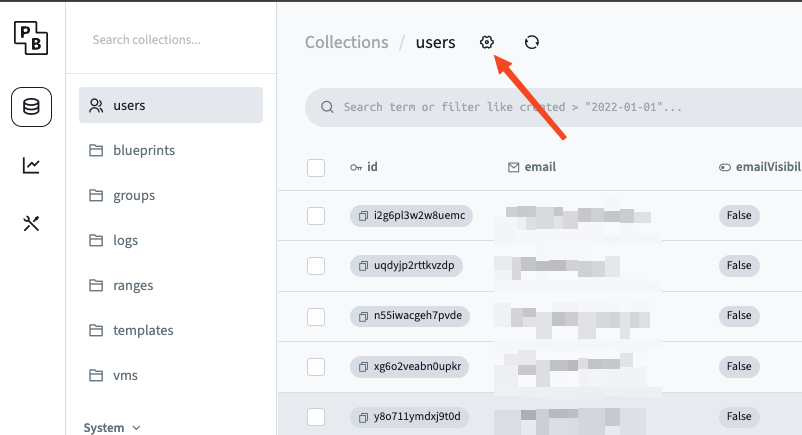
Click the gear icon next to the users table header
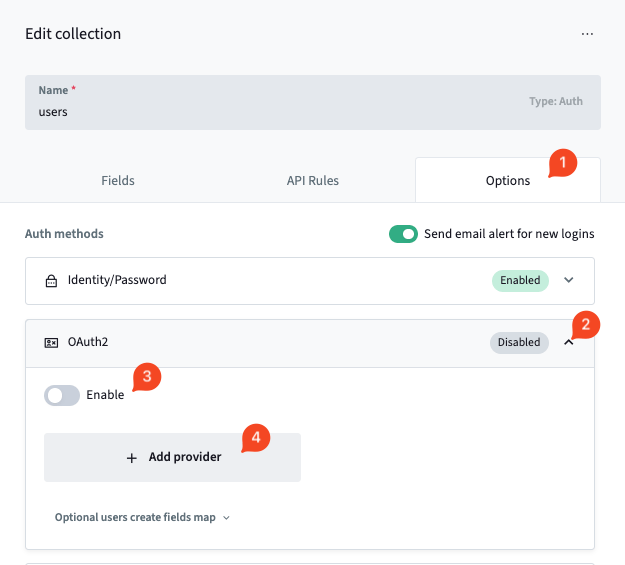
Click options, expand the OAuth2 field, toggle the Enable toggle, and click + Add provider
Click on your provider, and configure the values as required. Each provider will have their own setup steps.
Some OAuth2 providers require a domain to use them as a provider. You may need to set up DNS properly to use OAuth2
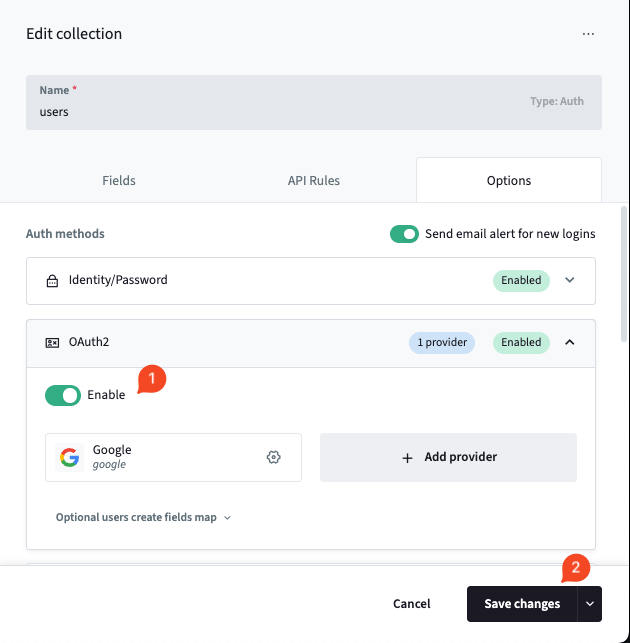
Once you have your provider configured, click Set provider config and double check that OAuth2 is Enabled and click Save changes.
Now users will be presented with a Login with... button on the login page for Ludus.
Account requirements
By default, SSO only works for users who already have a Ludus account. An administrator must create the account before the user's first SSO login. The email returned by the provider must exactly match the email stored in Ludus, including for accounts already linked to an SSO provider. Existing users retain their roles and access.
This restriction is controlled by /opt/ludus/config.yml:
sso_require_existing_user: true
The default is true, including when the key is absent from an existing configuration file. If no matching account exists or the provider email does not match, login is rejected with a message asking the user to contact an administrator to create the account or change this setting.
To allow automatic account creation on first SSO login, explicitly set:
sso_require_existing_user: false
To create SSO accounts without automatically creating a default range, set both options:
sso_require_existing_user: false
create_default_range: false
create_default_range defaults to true when omitted and applies to all new users, not just SSO users. It does not change existing ranges. See Default ranges for new users.
With sso_require_existing_user: false, any user who can authenticate to a configured OAuth2 provider can create a Ludus account. On first login, Ludus provisions a PAM user and Proxmox token. A default range is also created unless create_default_range is false.
Automatically created SSO users are standard users. When default range creation is enabled, they initially have access only to their own range. With create_default_range: false, they start without a default range. Admins can add them to groups, share ranges and blueprints with them, or grant access to other resources as needed.
You can disable the pocketbase web interface by running the following commands
systemctl unset-environment LUDUS_ENABLE_SUPERADMIN
systemctl restart ludus